Use Bailleur Lucide in Claude
With the Bailleur Lucide connector, your Claude assistant computes a flat’s return with the site’s engine and gives you the figures of its report: cash flow, taxes, net gain, annual return (IRR), a comparison of the French tax regimes and charts.
Add the connector to Claude
Copy this address, then paste it into Claude’s settings (“Connectors” → “Add” → “Custom connector”).
https://www.bailleurlucide.fr/api/mcpWhat the connector does
The tools:
- compute a listing: paste the link (Claude reads the listing), the text or a screenshot, and ask what it brings in;
- list your properties saved on Bailleur Lucide, with their figures and those of your SCI portfolios;
- show the report of one of your saved properties: the report summary row by row and the key figures, with links to the report and the detailed report;
- compute buying a main home (a home to live in): down payment, loan payment, total cash put in, cash in hand at the sale, buy or rent;
- change one of your saved properties (any field of the editor): Claude shows you each change, before → after, and the new figures; nothing is changed until you confirm;
- show the charts of a listing or of one of your properties (cash flow year by year, what you are left with if you sell), as pictures with their figures;
- save a listing as a new property in your account (a rental investment or a main home): Claude first shows you a summary, the property is created only after you confirm (“create and change properties” access, asked when connecting).
Install the connector
Six steps, once only.
1. In Claude, open “Settings” → “Connectors”, click “Add”, then “Custom connector”.
2. Name the connector “Bailleur Lucide”, paste the address below into the second field, then click “Continue”.
The address to paste:https://www.bailleurlucide.fr/api/mcp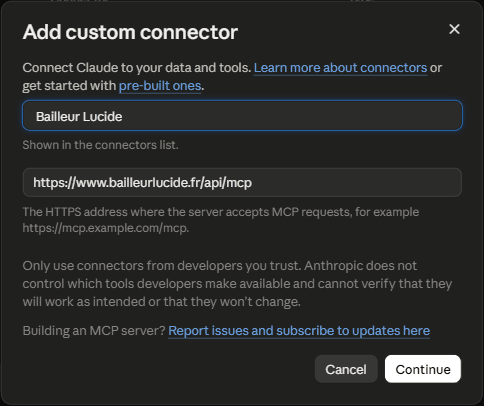
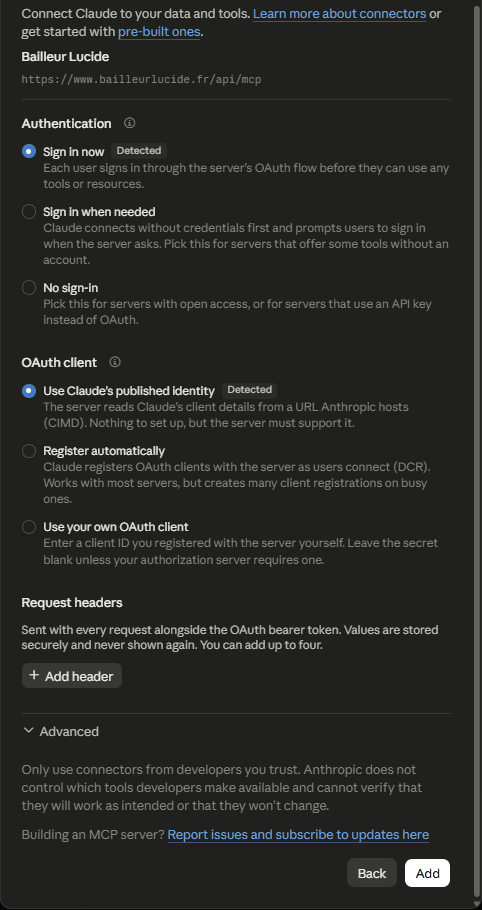
3. Leave “Sign in now” and “Use Claude’s published identity” selected (Claude detects them), then click “Add”.
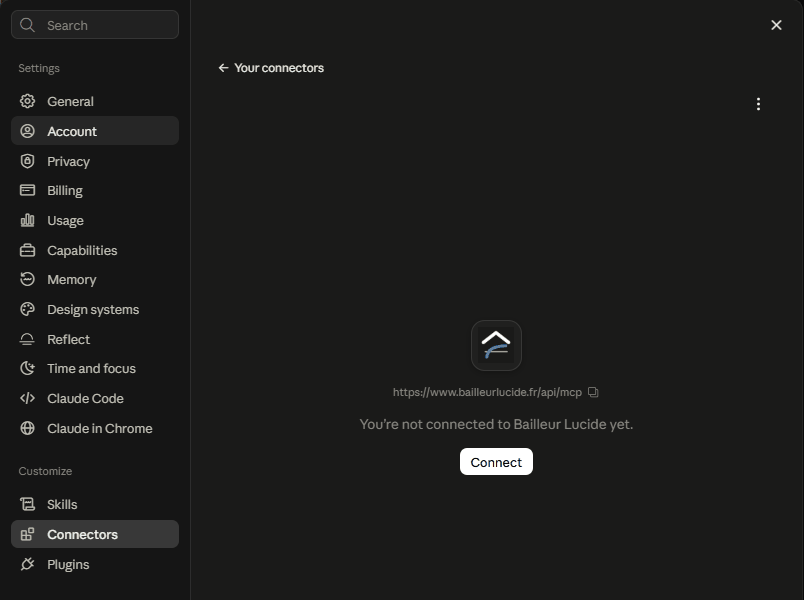
4. On the connector’s page, click “Connect”.
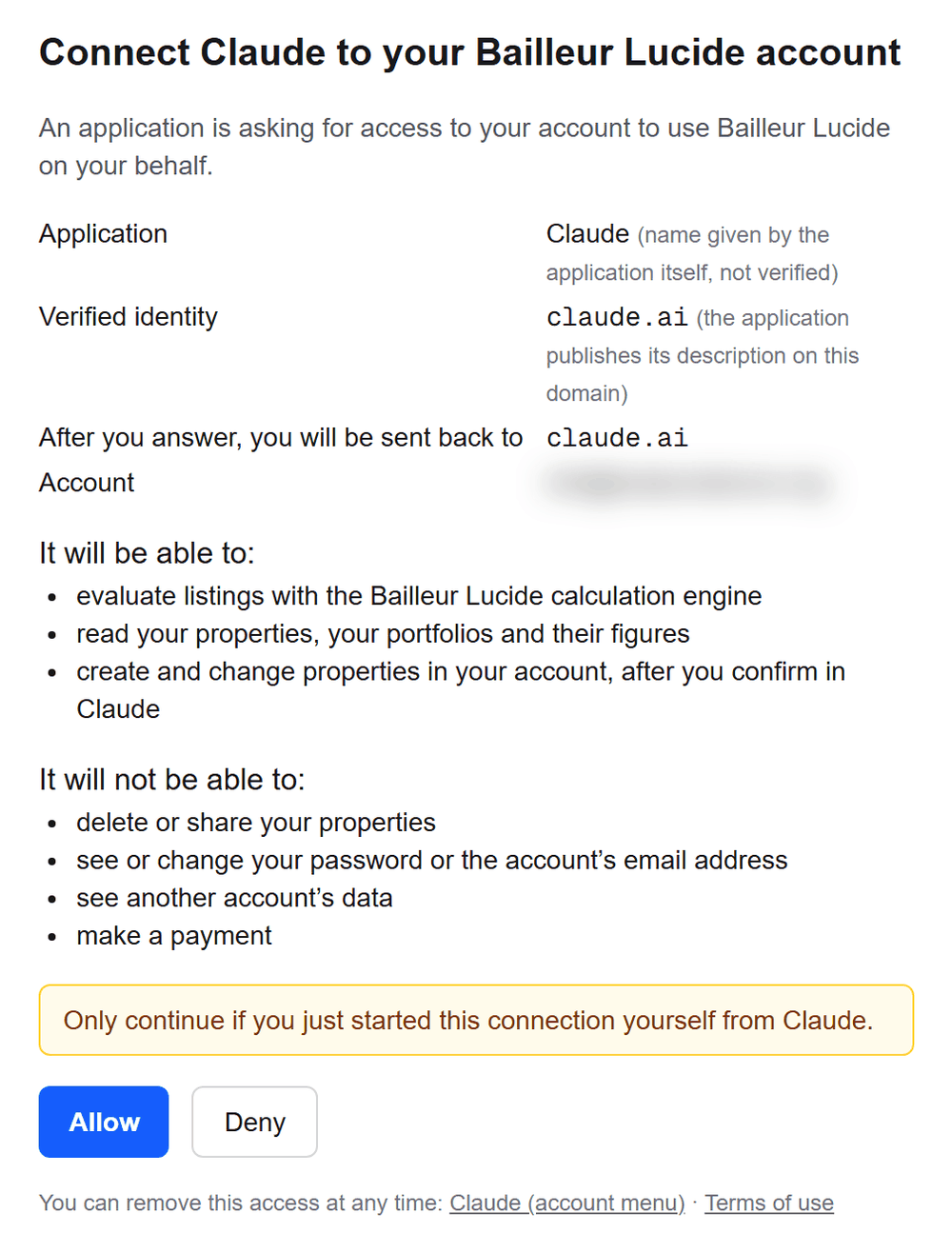
5. Sign in to Bailleur Lucide (or create a free account), check what Claude will be able to do, then click “Allow”.
6. You’re set: ask Claude your question, for example “Is this €180,000 flat rented €850/month in Melun profitable?”
Which Claude plan?
The connector works with Claude Free (one custom connector) and with the paid plans (Pro, Max, Team, Enterprise).
With a free account: 1 saved property, as on the site. Evaluations, charts, comparisons and changes to your property: unlimited. The premium pass saves properties without limit.
Example questions
Ask your question normally, for example:
- “Is this €180,000 flat rented €850/month in Melun profitable?”
- “Here is a listing link: what cash flow and what return with a 3.35% loan over 25 years?”
- “Compare this listing with my Bailleur Lucide properties.”
- “Which tax regime is best for this property: SCI à l’IS, LMNP, micro-foncier or réel foncier?”
- “I want to buy this flat to live in, I pay €1,000 rent today: is it better to buy or to keep renting?”
Your data and disconnecting
Claude only gets what you allow: evaluating listings, reading your properties, creating and changing them after you confirm. It can neither delete nor share your properties. The results are sent to your own Claude; Anthropic processes them under its privacy policy.
To remove the access, open “Connected apps” (link below) and click “Revoke”: access is cut immediately.
Connected appsPersonal data (connector)Anthropic’s privacy policy
Good to know
Results are estimates, not financial, tax or legal advice.
- the server never opens a listing link: Claude reads it and sends the figures;
- without a tax regime, the calculation uses LMNP au réel (furnished let, €7,500 of furniture), with one comparison line per other regime that applies; ask for the four-regime comparison to see them side by side;
- without a down payment, the one used is 10% of the price (the loan covers the price and fees, minus the down payment);
- if the listing gives no property tax (taxe foncière), it is estimated at €100 a month; without co-ownership charges, they are estimated at €150 a month in total (or the charges the tenant pays, if higher). These are default estimates, flagged in the answer: check the real amounts (taxe foncière notice, charges statement). Every assumption is listed in the answer;
- for a main home, the site’s own defaults apply (no rent received, no furniture, upkeep at €0 — flagged); Claude asks for your rent when it is missing (the cost against rent and buy or rent need it);
- you can give any assumption of the site’s editor (vacancy, growth rates, agency and management fees, insurances, loan fees, depreciation, LMNP / SCI / réel foncier / main-home settings…); Claude only needs the essentials and passes the others when you mention them — otherwise the site’s default applies, and every default used is listed in the answer (the ones you gave are marked “given”);
- the loan rate and term are never guessed: Claude asks you for them if they are missing;
- Claude gives the report’s figures; the “Is it a good deal?” analysis (your return against bonds, stocks, nearby properties and the national average, loan coverage, verdict) is on the site.
What’s new
- 19 October 2026 — free account: 1 saved property, as on the site; if it is already taken, Claude offers to replace its figures or the premium pass.
- 24 October 2026 — the report of one of your saved properties: its summary row by row and its key figures.
- 23 October 2026 — the connector gives the report’s figures and charts, with its links; the “Is it a good deal?” analysis stays on the site.
- 18 October 2026 — every assumption of the editor can be given to Claude, and your properties changed after confirmation.
- 17 October 2026 — main home: evaluate buying a home to live in, save it, its charts.
- 15 October 2026 — charts of a listing or of one of your properties.
- 15 October 2026 — default assumptions: LMNP au réel, a 10% down payment, estimated property tax and co-ownership charges.
- 15 October 2026 — save a listing as a new property (after confirmation).
- 14 October 2026 — first version: evaluate a listing, list and evaluate your properties.